 PATLY.AI
The references your examiner will find, read against every element of every claim.
Upload a patent, an application or a write-up of the idea, or paste the claims and specification. Patly searches the patent offices and the research literature the way an examiner does, charts each reference element by element, and draws the map: which reference reaches which limitation, which two references together reach a claim, and what is left untouched.
Then act on it: the rejection each claim is likely to draw, the amendment that moves it furthest, the references to cite. Edit a claim in place and novelty, the chart and the map move as you type.
$199 per application · nothing to install · read the guide
Three passes, then the map
- 01Search the terms of art
Queries are built from the claims, the synonyms your specification defines, and the vocabulary a searcher would use instead of yours. They run across the patent offices and the research literature, round after round, until new queries stop returning new references.
- 02Read each reference against each element
Every claim is split into its elements, including those it inherits from its parent. Each reference is then charted element by element: disclosed, partial or absent, with the sentence that carries it. References dated after your priority date, and the inventors' own disclosures inside the one-year grace period, are set aside from the prior art and labelled.
- 03Revise the claims and watch them move
Edit a claim in the panel, or take one of the drafted amendments with its support quoted from your specification. Novelty, the element chart, the 103 pairs and the map re-score in milliseconds. Search again on the revised claims when you want the references that only the new language reaches.
The guide walks through every control, starting with the three things worth doing in the first fifteen seconds.
A pending application, read the way an examiner reads
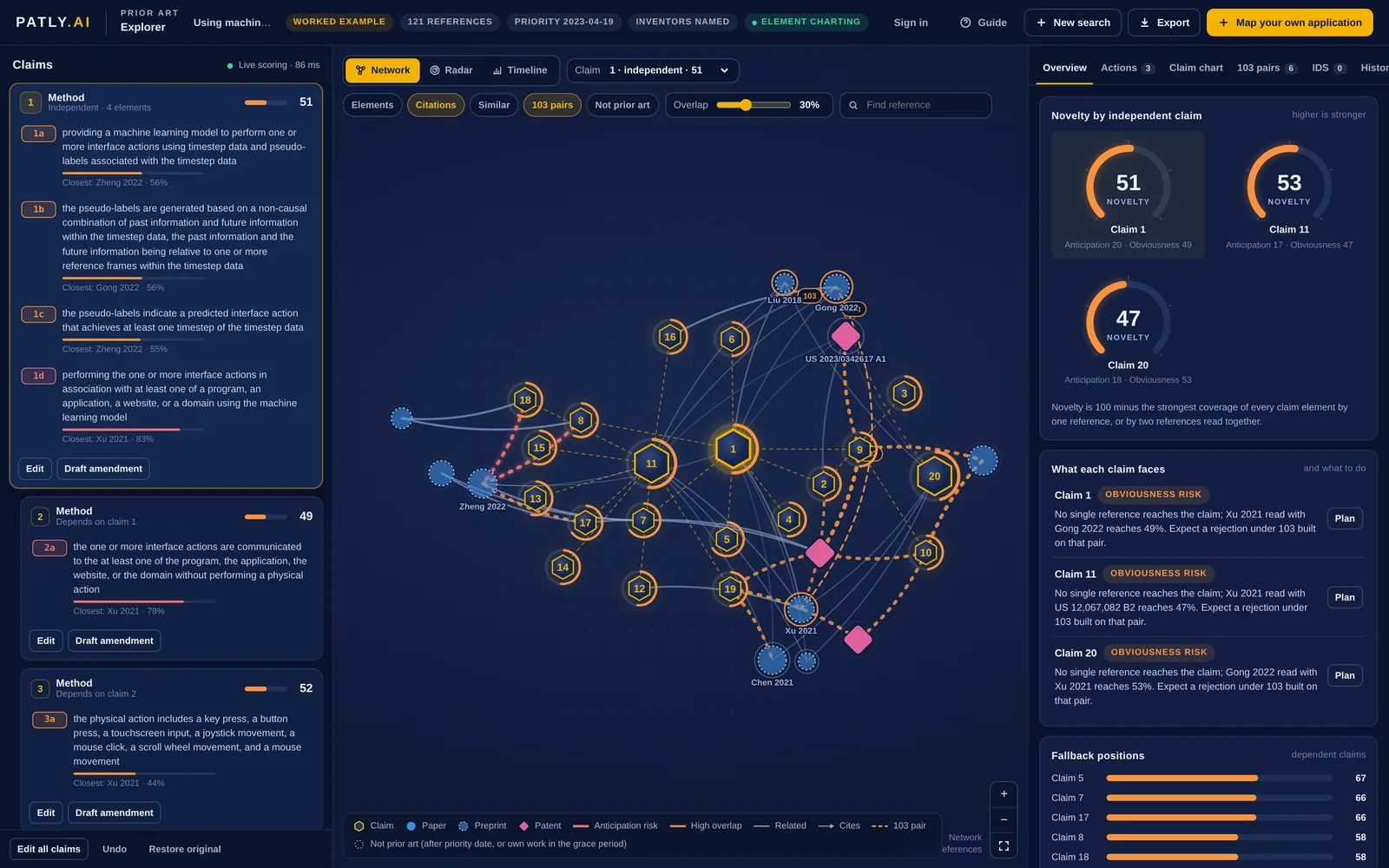
We ran the explorer on US 2025/0329162 A1, Using machine learning to train and use a model to perform automatic interface actions based on video and input datasets, an application on agents that learn to act inside programs and websites by watching unlabeled video: a small model labels the actions in a large pile of footage from the frames before and after each moment, and the agent is trained on the result. Filed 3 May 2025, published 23 October 2025, priority 19 April 2023, and still pending. Its twenty claims are numbered 1 to 20 here; the published application numbers them 21 to 40, the first twenty having been cancelled at filing. Nothing was told to the tool except the specification, the claims, the priority date and the inventors' names.
What it found
Claim 1 scores 51 for novelty. No single reference reaches it: the closest, Xu 2021 on grounding open-domain instructions to automate web support tasks, has an agent that carries out actions on a website, which is most of the last element, but says nothing about labelling video with a model that looks both backwards and forwards in time. That element is the one the art leaves alone. Gong 2022, a transformer for long-term action anticipation that reasons over the whole sequence, the actions already seen and the ones still to come, is read as reaching part of it, and together the pair reaches 49. The map draws that pair in gold.
The inventors' own paper on the method, published ten months before the priority date, is set apart as their own disclosure inside the one-year grace period and does not count against them; the family's earlier grant, US 11,887,367, sits on the map dated after the priority date and labelled as such, with the 45 other references that came after it. The claims that stand furthest from everything retrieved are 5 and 7, at 67 and 66: three frames of context around each moment, and a model that goes on to label more video for itself.
A published United States application that has not been granted, used here to show what the output looks like. The scores are automated estimates from public documents, not a legal opinion on patentability.
- 1a a model that performs interface actions from timestep data and pseudo-labels partial
- 1b pseudo-labels from a non-causal reading of past and future frames absent
- 1c each pseudo-label names the action that achieves a timestep partial
- 1d performing the actions in a program, an application, a website or a domain disclosed
103 pair Xu 2021 reaches the interface actions; Gong 2022 brings the reading of past and future. Together, 49.
Seven things, out of one run
For each independent claim, the rejection it is most likely to draw and the references behind it, the elements that carry the claim, the supported amendment that moves it furthest, the references to cite and the claims to fall back on. Apply the amendment with one press and every score re-reads.
Claims and references as one graph: citation edges between references, similarity edges, and a gold edge wherever two references together cover a claim. Hovering a node says how it relates to the claim it is nearest.
Every element against every close reference, marked disclosed, partial or absent, each with the sentence that carries it. Exports as CSV.
The combinations that matter, with which reference supplies which element, and how similar the two are, since a distant pair is a harder combination to make.
Pick the references that belong on the disclosure statement and take the list out in the form's order, with the ones after your priority date flagged.
Three drafted alternatives per claim, each adding a limitation with the supporting sentence quoted from your own specification, and the map re-scored the moment you apply one.
The interactive report is a single HTML file that works offline and re-scores claims in place, and the brief is the same reading as text, ready for a memo. Send either to counsel, or keep the map on your account and open it again from any browser.
Per application, nothing else
One map covers one application: the search, the element-by-element reading, the pairs, the amendments and the IDS. Come back to it as often as you like, revise the claims and re-score for free. A second search on revised claims costs nothing.
- The patent offices and the research literature
- Claim chart, pairs, amendments, IDS
- Interactive report to keep
- Drawn down as your office runs them
- Maps shared across your account
- No expiry
- For an office filing at volume
- Access codes for your practitioners
- No expiry
The same search is one of the three line items in the filing package, with the drawings and the filing review, and the examination charts the art it cites the same way.
What people ask first
The claims and specification you paste are sent to the search sources as queries and to the model that reads the references. They are stored on this site so your map can be reopened, and you can delete a map at any time. We do not file anything, publish anything, or share your text with anyone else.
No. It reads references against the claims of one application, for patentability. Freedom to operate asks a different question about other people's claims, and is a job for a practitioner.
It keeps searching until new queries stop finding new references, across the patent offices and the research literature. That is a good deal more than a keyword search and a good deal less than a professional searcher with subscription databases. The map says what each search returned, so you can see the gaps rather than guess at them.
They are kept, labelled, and left out of the novelty scores, because they are often the best description of the field. Applications filed before your priority date but published after it are treated as prior art under 35 U.S.C. 102(a)(2), or pre-AIA 102(e) if your application's effective filing date is before March 16, 2013. The inventors' own disclosures inside the one-year grace period are set aside and marked.
The IDS list and the claim chart are built for that, and people do. Have a registered practitioner review both before they go to the office: the readings are automated, and 37 CFR 1.56 duty of disclosure rests with you.
Technology transfer offices, university patent counsel, patent agents and attorneys who want to see the shape of the art before drafting or before responding, and faculty inventors who want to know whether their claim is worth filing.
Map the application you are drafting right now
Describe the invention, paste the claims as they stand, attach the draft and the drawings if you have them, and read the map.